Visual Field Documentation
Document the job.
Prove the work.
Share the proof.
Tracepoint pins your job-site photos to the exact spot on the building, shares them as a read-only link, and drafts the inspection report from what you captured.
Free forever plan available. No credit card required.
Built for facade engineers, roofing contractors, property managers, MEP inspectors, and anyone who needs to prove what they found and what they fixed.
Flagship — AI inspection reports
Turn the findings you captured into a report draft.
You already tapped the markers, added the captions, and dated the photos. Tracepoint drafts the inspection write-up from that record — text-grounded, never from your images — with each finding classified and laid out for a professional to review, edit, and sign. A first draft that saves the evening, not a replacement for your judgment.
- Text-grounded — the model reads labels, captions, dates, and counts, never your photos
- Human-reviewed before anything ships; drafts are labeled machine-generated
- Your project data is never used to train AI models (paid plans)
- Team — 20 drafts/mo · Business — 100 drafts/mo
Findings
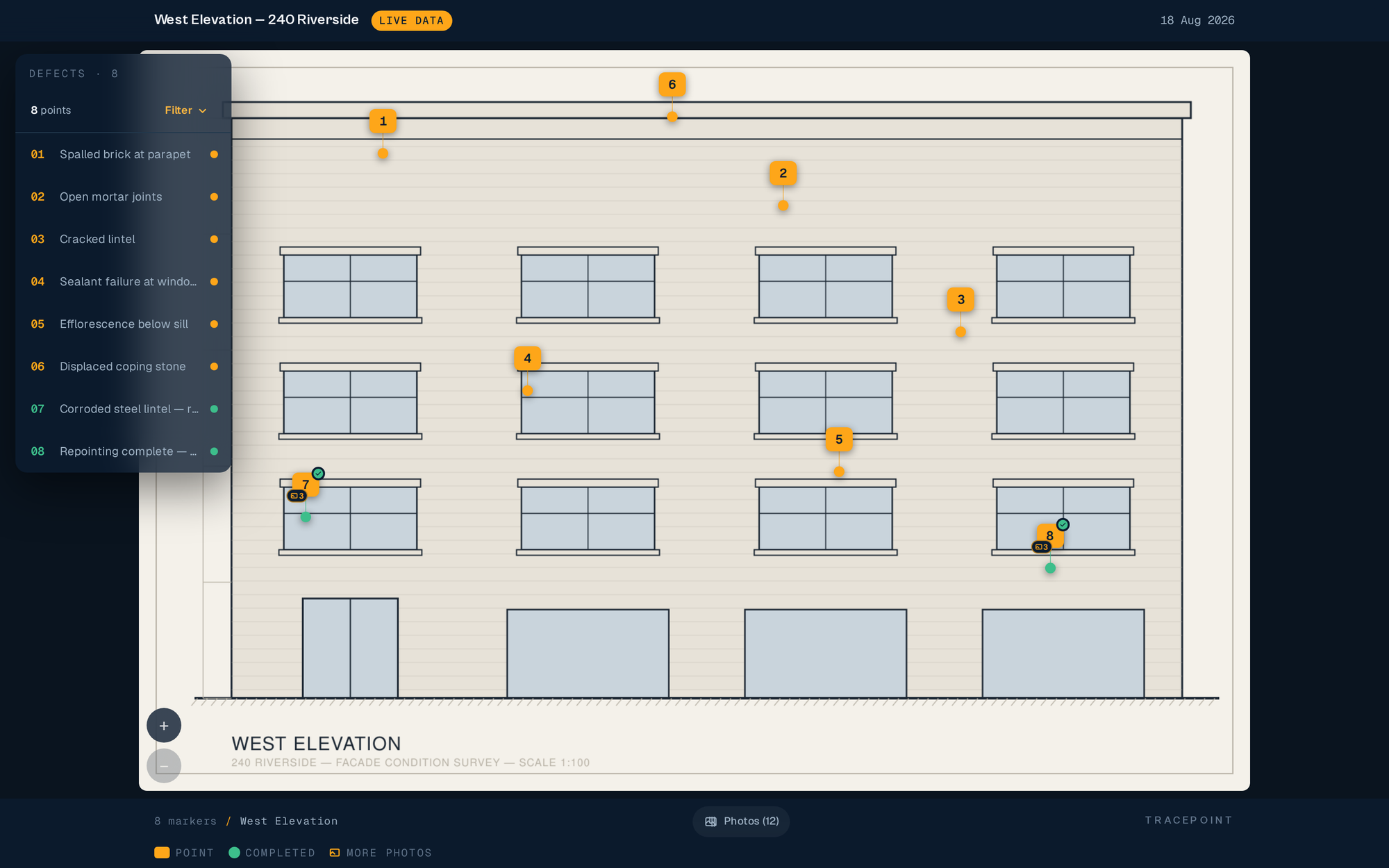
Displaced parapet coping, NW corner — spalled bedding mortar.
Vertical crack through lintel, 4th-floor window head.
Repointed spandrel; sealant joints intact at review.
Machine-generated draft — text-grounded, for professional review before issue.
The problem
The way field documentation works today is broken.
You take 200 photos on a job site. They go into a folder. Nobody knows which photo is from which location. The client asks where the crack was. You dig through images for 20 minutes. The engineer wants to see how it looked at the start next to how it looks now. You open three apps. The field worker uploads to the wrong project. Again.
The solution
There's a better way.
Every photo pinned to the exact spot it was taken. First photo, progress, and completed — one timeline per location. Share a link. Anyone can view it. No app to download, no login required. Your field workers upload from their phone with one tap. Your clients see exactly what you found and what you fixed.
The workflow
How it works
Three steps. Five minutes. A documentation system that actually makes sense.
Upload your plan or photo
Start with any image — a building elevation, a floor plan, a roof photo, an architectural drawing. Upload a PDF and we'll rasterize the page you need. Or shoot it on your phone on the spot.
Pin points where the work is
Tap anywhere on the image to place a numbered survey callout. Add a label, a measurement, or a voice caption. Attach the first photo. Your field workers add progress shots from their phones as the job moves.
Share a link — or draft a report
Publish and send the link to your client, engineer, or building owner. They tap a marker and see the full photo timeline — no login. When you're ready, draft an inspection report from what you captured.
Capabilities
Everything you need. Nothing you don't.
First-to-Completed Photo Timeline
Every marker holds a full photo history — the first photo, progress shots as work happens, and the completed shot. Drag a slider to put the first photo and the completed shot side by side.
Per-Photo Provenance
Every photo carries who captured it, on what device, and how the device's clock compared to when it was uploaded — written to a tamper-evident history. A condition record that holds up over time.
Field-Worker Links
Text your field workers a link — no app install, no account needed. They land in a camera-first screen scoped to just their assigned area. Field workers are always free.
Filter Everything
Filter markers and photos by author, discipline, and exact date — in the builder, in the review queue, and in the client viewer. It works on the phone in your hand on site, not just at the desk.
Takeoff → Bluebeam
Mark counts, lengths, and areas on the real plan in the field. Totals roll up per work item and export as a Bluebeam-native PDF that Revu re-measures as its own. Included on every plan.
Review Queue + Inspector Reel
Field captures land in a review queue you clear like a reel — inspect, attach to a marker, flag, or discard, without leaving the flow. Discarded captures stay restorable.
By trade
Built for the field. Works for every trade.
Pricing
Simple pricing. Field workers always free.
Free
.
Everything you need to document your first project — free forever.
- 2 admin users
- 1 active project
- Unlimited field workers
- Core hotspot documentation
Solo
.
For the independent operator running multiple jobs.
- 1 admin user
- 10 active projects
- Unlimited field workers + SMS links
- PDF reports + download controls
Team
.
For crews that need AI report drafts and daily reporting.
- 3 admin users
- 25 active projects
- AI report drafts (20/mo)
- Review mode + daily PDF reports
Business
.
For firms that need scale, branding, and priority support.
- 10 admin users
- Unlimited projects
- AI report drafts (100/mo)
- Custom branding + priority support
Multi-org, SSO, or portfolio needs? Talk to us. support@tracepointapp.com
See full pricingYour next inspection.
Documented before you leave the site.
Start free. Upgrade when you're ready.