Facade inspection & restoration
Every condition.
On the elevation.
From found to fixed.
Pin each crack, spall, and displaced unit to the exact spot on the elevation. Follow it from the first photo to the completed repair. Then draft the inspection report from the record you already built.
For engineers, architects, and restoration contractors, including FISP / Local Law 11 cycle work.
On a facade job
From the first drop to the closeout
Load the elevations
Upload the drawing set as a PDF and pick the pages you need. Each page becomes its own view. No drawings? Shoot the wall and use the photo. A key plan shows which elevation each view is.
Pin each condition
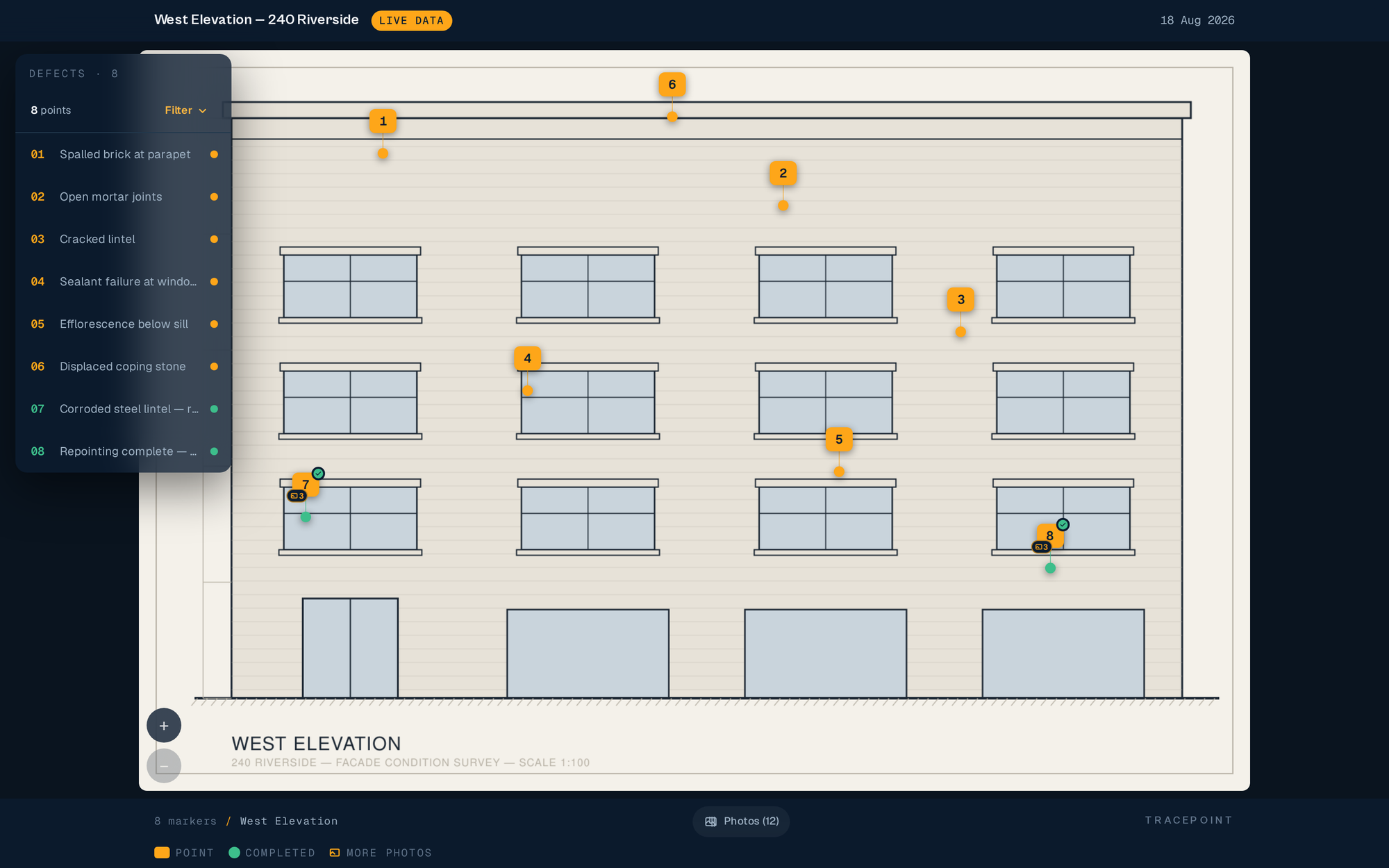
Tap the crack, the spall, the displaced coping. Each one gets a numbered callout with a label, a measurement if you want one, and its first photo. The list of conditions builds beside the elevation as you go.
Follow it through the repair
The restoration crew adds progress and completed photos to the same number. Open a condition and drag between the first photo and the finished repair.
Share it and draft the report
Publish a read-only link for the owner and the engineer of record. When the fieldwork is done, draft the inspection report from the record you already built.
AI inspection reports
Turn the findings you captured into a report draft.
You already tapped the markers, wrote the captions, and dated the photos. Tracepoint drafts the inspection write-up from that record, from the text and never from your images. Each finding gets an observation, an optional FISP class, and a plan locator that ties it back to its spot on the elevation. Edit it in the full-screen editor and export an editable Word document.
- Reads labels, captions, locations, dates, and counts. It does not read your photos.
- Drafts are labeled machine-generated and are reviewed by a person before anything goes out.
- On any paid plan you can exclude your organization's content from AI model training.
- Team plan: 20 drafts a month. Business plan: 100 a month.
Findings
Displaced parapet coping, NW corner. Spalled bedding mortar.
Vertical crack through lintel, 4th-floor window head.
Repointed spandrel; sealant joints intact at review.
Machine-generated draft, text-grounded, for professional review before issue.
Illustration with sample findings
Repair quantities
Count it while you're on the drop.
Calibrate an elevation once, then mark counts, lengths, and areas on it from your phone: lintels by the each, crack repair and sealant by the linear foot, repointing by the square foot. Totals roll up per work item and export as CSV, a printable PDF, or a Bluebeam PDF that Revu can re-measure.
See how takeoff works- EACounts. Lintels, anchors, units to replace.
- LFLengths. Cracks, joints, coping, sills.
- SFAreas. Repointing, patching, coating.
What's in it
Built for work on an elevation
Numbered callouts that stay readable
An anchor dot sits on the exact point and the numbered tag sits offset from it, so a busy elevation doesn't turn into a pile of pins. Overlapping callouts pull apart on a phone so you can tap the right one.
Shot-list mode
Walk the building and tap every point you need to document before you take a single photo. Add a typed or voice caption per point. You leave with a numbered list of what still needs a photo.
Desk import from a real camera
Shot the drop on a DSLR? Import the JPEGs at the desk and attach them to the points you placed on site. Tracepoint orders them by capture time and you can adjust any pairing by hand.
Same angle on the completed shot
Capturing in the app, the first photo shows ghosted over the live camera, so the completed photo is framed from the same spot as the first one.
A record of who took what, and when
Each photo keeps who captured it, on what device, and how the device clock compared with the upload time. Entries go into a hash-linked history, and machine-generated text stays labeled as machine-generated.
Crew upload by text link
Text the mechanics on the scaffold a link. No app install and no account. They see only the elevations you assigned them, and what they shoot waits for your approval before it goes on the record.
Straight answers
FISP and Local Law 11: what it is and isn't
- It is not a filing tool.
- Tracepoint does not file a FISP report or submit anything to the Department of Buildings. It is the photo and location record behind the report you file.
- The draft is not a professional opinion.
- The report draft is written from your labels, captions, locations, and dates. It does not look at the photos and it does not assess the building. A qualified professional reviews, edits, and signs.
- The classification is yours.
- A draft can carry a Safe, SWARMP, or Unsafe class for each finding. That is a starting point for you to change, not a determination.
Your next inspection.
Documented before you leave the site.
Start free with one project and unlimited field workers.
Doing interior or GC work instead? See the contractor path